

This post is sponsored by Comu.
If you work from home and spend a lot of your day in meetings, you probably know that the work doesn’t end when the call does. There are notes to sort through, things to follow up on, and details you hope you didn’t miss.
Maybe a client mentioned a change to a project, but you were still writing down the last thing they said. Or you have three pages of notes and now need to turn them into an email that makes sense!
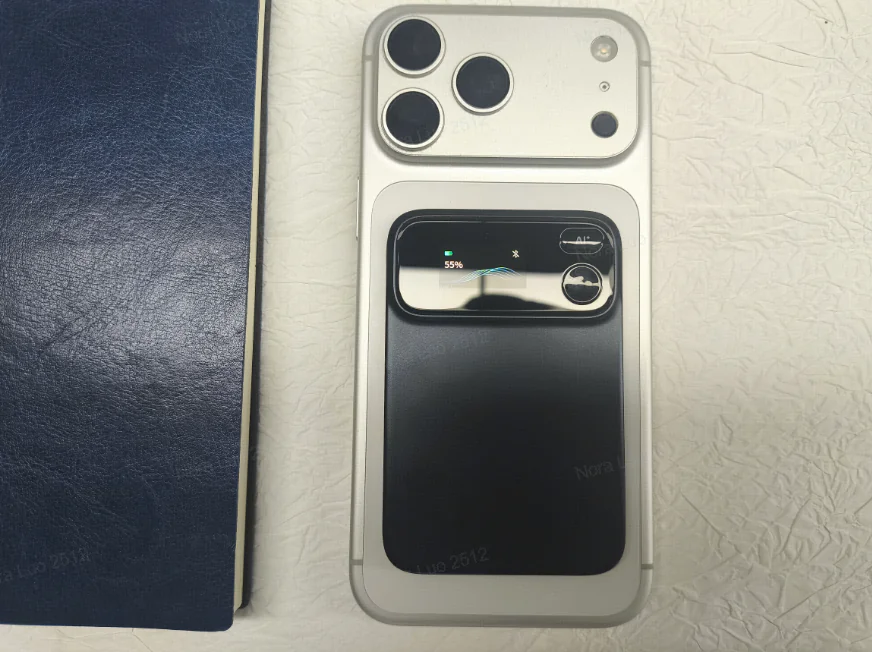
Comu Action Pro is a small recording device designed to help with that part of your workday. It records conversations and uses AI to help turn them into notes and other useful work.
Below is a look at what it offers for remote meetings, what comes with the free plan, and how it compares with Plaud.
What Is Comu Action Pro?
Comu Action Pro is a pocket-sized recorder with a companion app. According to Comu, you can use its dedicated AI button to ask for things like a meeting summary, a document, a follow-up email, or a presentation.
So, say you finish a client meeting and need a short recap of what was agreed on. The idea is that the conversation gives you a starting point for that recap, rather than having to write it all from memory.
This could be useful for virtual assistants, freelancers, consultants, and other remote workers who regularly talk with clients or teammates. The more notes and follow-up work your job involves, the more reason you have to consider a tool like this.
Unlimited Transcription Without a Paid Plan
One important feature is that Comu’s free Starter plan includes unlimited transcription and basic summaries. Transcription simply means turning the recorded conversation into written text.
If you have frequent meetings, a monthly limit on transcription minutes can become something else to keep track of. A few long calls can use up an allowance faster than you might expect.
Having a written version also makes it easier to go back over something you missed. You may only need to check a deadline or a client’s instructions, rather than listen to the whole recording again.
Keep in mind that unlimited transcription doesn’t mean every AI feature is unlimited. Comu has separate limits and paid plans for more advanced uses.
Up to 70 Hours of Recording

Comu advertises up to 70 hours of continuous recording on a charge, along with USB-C charging. That’s the company’s battery rating, so your actual results can vary.
For someone with several meetings in a day, longer battery life means fewer worries about whether the recorder was charged before the next call.
It is also a separate device, which may appeal to you if your phone already has enough going on. You can keep the recording itself separate from the messages and notifications competing for your attention.
Keeping Track of Earlier Conversations
Comu describes its AI Memory feature as a way to connect information across multiple conversations over time.
Think about a project that takes several meetings to work through. The first call might cover the original plan, while later calls bring changes, new questions, or different deadlines.
Having those details connected could help when you need to get back up to speed before another meeting. That is the benefit Comu describes, although you’ll still want to check important details against the original notes or recording.
Help With the Work After a Meeting

Comu’s AI Agent features are designed to turn conversations into outputs such as emails, documents, slides, and action items.
For a remote worker, that might mean starting with a list of what needs to be done after a call. Or it could mean getting a first draft of an email that sums up the discussion.
Those are useful places to get help when you have another meeting coming up and don’t want the follow-up work to pile up.
You should still read anything generated before using it. Names, dates, numbers, and promises to a client are all things to double-check, even when the draft looks polished.
Does Anything Cost Extra?
You buy the recorder separately. The Starter plan is free, while Premium and Elite are optional subscriptions.
Comu currently lists Premium at $14.99 per month, or $10 per month billed annually. Elite is $39.99 per month, or $29.99 per month billed annually.
Advanced tasks use what Comu calls Agent Credits. Starter includes 500 credits a month, Premium includes 5,000, and Elite includes 40,000.
The free plan also limits translation and in-depth analysis. So if your main reason for buying is to create lots of documents or presentations, check the plan details as well as the device price.
How Does Comu Compare With Plaud?
Plaud makes several recorders, so it helps to name the model you’re comparing. Plaud Note Pro is one option for calls and meetings.
The clearest difference for frequent meetings is the free transcription allowance. Plaud’s Starter plan currently includes 300 minutes a month, while Comu includes unlimited transcription and basic summaries.
You can get more minutes through Plaud’s paid Pro plan, and it has a paid Unlimited plan as well. So the difference here is what you get without paying for a subscription.
For battery life, Plaud advertises up to 50 hours of recording for Note Pro in Endurance mode, compared with Comu’s advertised 70 hours. These are manufacturer ratings, rather than results from a side-by-side test.
Plaud also offers AI summaries and a way to ask questions across multiple files. Comu puts a lot of emphasis on using its AI button to create follow-up work, including documents, emails, and slides.
If you’re deciding between them, start with how much you record and what you need afterward. Someone who needs occasional meeting notes may have different needs from someone creating client follow-ups every day.
A Few Things to Consider Before Buying
Make sure recording is allowed by your employer or client and that everyone involved knows about it. You’ll also want to check how the app handles the information you’re recording.
Check your exact meeting setup, too, especially if you use headphones. Comu’s product page has mentioned an October rollout for headphone recording, so confirm that the feature you need is available before buying.
And if your existing meeting software already gives you the notes you need, consider whether a separate recorder would make your day easier.
Where to Learn More About It
Comu has provided the code REALMU10 for my readers to get $10 off. Enter it at checkout and check the discount and final total before placing your order.
You can see the Comu Action Pro and its current plan details on Comu’s website.
For remote workers who spend a lot of time in meetings, the unlimited basic transcription and long recording time are the main reasons to consider it. Just be sure the features and plan you choose cover the follow-up work you actually need help with.

Anna Thurman is a work at home blogger and mom of two. She has been researching and reviewing remote jobs for over 15 years. Her findings are published weekly here at Real Ways to Earn.